
TruHearing App
Sivantos Pte. Ltd.Medical
2.91.86K Reviews
- Version
- 2.8.0.16337
- Installs
- 100.00K
- Age Rating
- Everyone
Screenshots
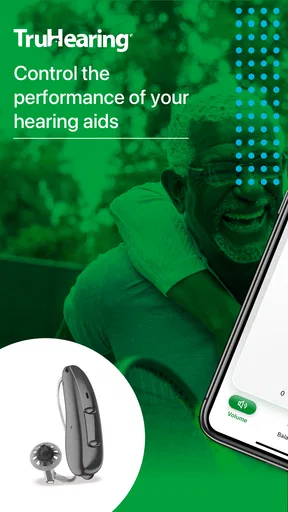
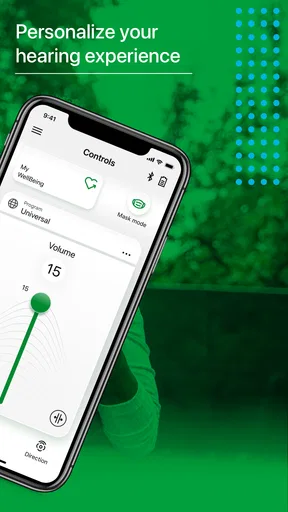
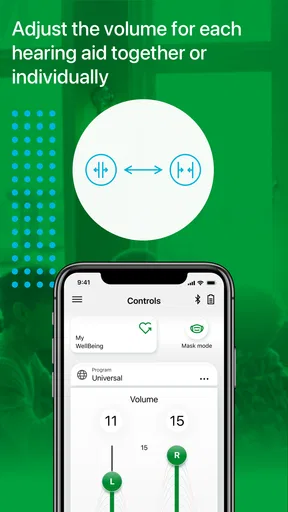
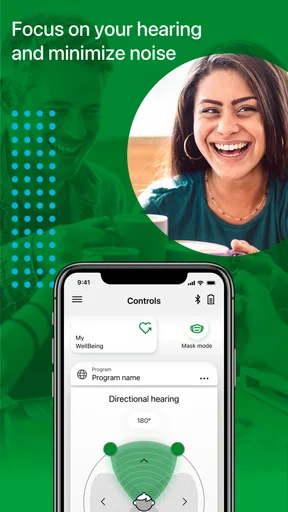
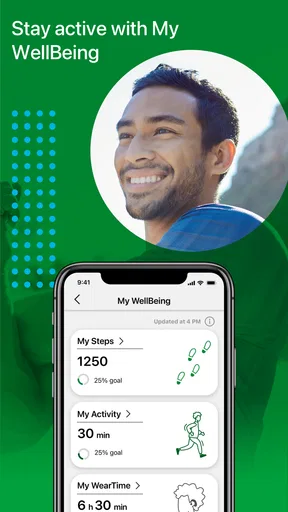
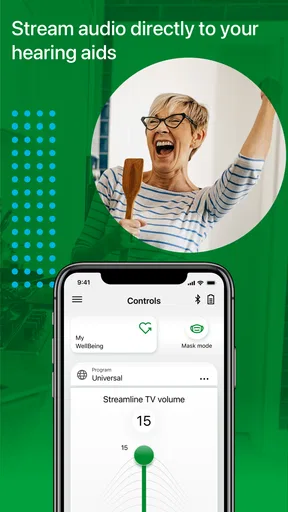
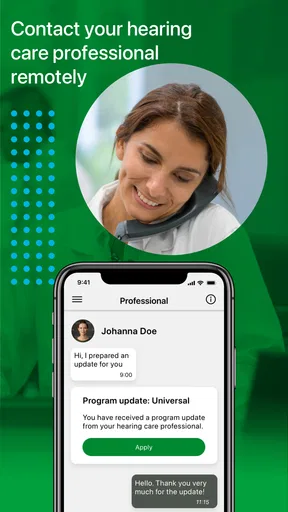
Our Review of TruHearing App
 Analysis by Appyee
Choosing a hearing-aid companion app is less about collecting the most features and more about finding the tool that makes daily adjustments feel manageable. I spent time looking at TruHearing App from that practical angle: how useful it is when you are already wearing compatible hearing aids, how much effort it adds to an ordinary day, and whether it is a sensible choice compared with broader hearing, accessibility, or manufacturer-specific alternatives.
This is a free medical app from Sivantos Pte. Ltd., intended for everyone rather than a specialist audience. It has passed the early novelty stage since its release on July 20, 2020, and the current version is 2.8.0.16337. That matters because a hearing-aid app needs to feel like a dependable part of a routine, not something you open once and forget. At the same time, its average rating of 2.9 from around 3,400 ratings suggests that the experience is not equally smooth for every user.
What I would check before choosing it
My first decision criterion is compatibility. TruHearing App is not a general hearing test, a replacement for professional fitting, or a universal remote control for every hearing aid. Its value begins when it works with the hearing aids and service arrangement you already use. Before installing it, I would confirm that the specific devices are supported and that the phone meets the minimum operating requirement of OS 10. That simple check can save a frustrating afternoon of pairing attempts.
The second criterion is the kind of control you actually want. Some people only need their hearing aids to work quietly in the background. Others want a quick way to make listening more comfortable when moving from a calm room to a busy restaurant, a television session, or a conversation outside. An app like this is most useful when it reduces the need to handle tiny physical controls or repeatedly visit a clinic for minor day-to-day preferences.
I would also think about who will use the app. A confident smartphone user may appreciate having hearing-aid controls close at hand, while someone who dislikes phone settings may prefer physical controls or help from a family member. The app can be part of a good hearing routine, but it should not become another source of uncertainty. If changing a setting makes you nervous, simplicity is more important than the number of options.
There is also a difference between managing hearing aids and solving hearing problems. TruHearing App belongs to the first group. It can support the everyday use of hearing aids, but it does not replace a hearing evaluation, professional programming, or advice about discomfort and sudden changes in hearing. I would treat it as a control and support layer, not as medical care in an app.
How I would prepare for the first session
I would begin at home, with the hearing aids charged or otherwise ready for normal use, the phone updated enough to meet the operating requirement, and unnecessary Bluetooth connections temporarily out of the way. I would keep the hearing aids nearby rather than trying to connect them from another room. This is not glamorous advice, but it makes troubleshooting much easier because every variable is close and visible.
After installation, I would avoid testing the app in a crowded place. A quiet room gives you a better chance to notice whether the hearing aids respond to a change and whether the result is comfortable. I would make one adjustment at a time, wait, and listen. Changing several controls together makes it difficult to know which one helped and which one caused an unpleasant result.
That one-change rule is especially useful for a new wearer. Hearing can feel different from minute to minute as your attention adapts, and a setting that seems impressive for a few seconds may become tiring after a longer conversation. I would make a small note of what worked in common situations instead of chasing a perfect setting immediately.
Where TruHearing App fits especially well
The strongest reason to choose this app is convenience for people who already rely on compatible hearing aids and want their phone to be part of the daily control process. Rather than treating the hearing aids as isolated devices, the app gives you a central place to interact with them. That can be reassuring when you are still learning what feels comfortable.
Imagine a normal weekday. In the morning, you listen to a family member in a quiet kitchen. Later, you sit near a television, then travel to a busier café for a short meeting. A physical button may still be useful, but an app can make the transition less awkward when the hearing aids are difficult to reach or when you want to make a change discreetly. The real benefit is not the novelty of using a phone; it is being able to respond to the environment without interrupting the conversation.
I also see value for relatives who help an older family member. With permission and patience, a family member can sit beside the user and help check the app rather than immediately taking the hearing aids away for inspection. That can preserve the wearer’s involvement in the process. The best approach is to teach the user what each familiar adjustment does, not to turn the phone into a mysterious control panel managed entirely by someone else.
Another practical strength is repeatability. If you discover that a modest adjustment makes television listening less tiring, you can use that knowledge again instead of relying on memory. The same applies to conversations in restaurants or during outdoor walks. I would not assume that one setting is ideal everywhere, but having a consistent way to make small changes is more useful than starting from scratch each time.
The app is most valuable when it turns hearing-aid management into a calm, repeatable routine. That is a more realistic benefit than expecting it to solve every difficult listening environment. Hearing aids still have physical and acoustic limits, and no phone interface can remove background noise from the world.
Small habits that make the experience better
I would keep the app in an easy-to-find place on the phone rather than burying it in a folder. That sounds minor, but accessibility tools lose much of their value when opening them takes too many steps. If another person sometimes helps you, I would also agree on simple words for the adjustments you use most often, such as “quieter,” “clearer,” or “more comfortable,” instead of expecting them to understand technical language.
For a new user, I would test changes during short listening periods. Try one adjustment while reading with the television on, then try it during a conversation. The setting that sounds pleasant during television may not be the one that helps with speech. This comparison helps you judge the app by outcomes rather than by how many controls appear on the screen.
I would also avoid using the app as a reason to constantly monitor hearing. If you keep checking and changing settings every few minutes, listening can become an exhausting technical exercise. Once a comfortable everyday arrangement is found, leave it alone for a while and judge it over a complete activity. That is a better test of usefulness than a quick impression.
What the rating tells me about expectations
The app has more than 100,000 installs, so it is not an obscure experiment. Still, the average rating of 2.9 and around 1,900 written reviews tell me to approach it with realistic expectations. A middling rating does not prove that the app will fail for you, because connection problems, phone models, hearing-aid compatibility, and user expectations can all affect the experience. It does mean I would not install it five minutes before an important appointment and assume everything will be effortless.
For me, that rating changes the preparation advice. I would install it while I still have time to ask for help, check the hearing aids, and learn the basic workflow. I would also keep an alternative way to adjust or use the devices if available. An app should add convenience, not leave you unable to manage your hearing aids when the phone is unavailable or the connection is temperamental.
Where another type of solution may fit better
The usual alternatives fall into several categories, and each solves a different problem. A manufacturer’s companion app may be the better choice when your priority is deep integration with a particular hearing-aid family. A general accessibility feature built into the phone may suit someone who wants fewer separate apps. A physical remote or direct controls may be preferable for a user who finds smartphone menus confusing. A clinic-led fitting remains the right path when the main issue is comfort, speech understanding, or an unexplained change in hearing.
That does not make TruHearing App inferior. It means the app is most sensible when its role matches your needs. If you want a broad hearing test, hearing-health education, or tools unrelated to managing your hearing aids, this is probably not the right place to start. If you want to control unrelated audio devices, a general audio app may be more appropriate. If you rarely carry a smartphone, the phone-based approach may add more friction than value.
I would also hesitate to recommend it as the only option for someone who regularly needs help but has no reliable person nearby. Any app-based workflow can become difficult when pairing, navigation, or phone changes are involved. In that situation, a simple physical control or a clearly established support routine may be more dependable. The question is not whether using an app is modern; it is whether the user can operate it comfortably on an ordinary day.
People who expect automatic medical guidance should look elsewhere as well. This is not a substitute for discussing pain, dizziness, sudden hearing loss, or persistent difficulty understanding speech with a qualified professional. If the app appears to be working but hearing remains poor, I would not keep adjusting settings indefinitely. That is the point where professional assessment becomes more useful than further experimentation.
The trade-off between phone control and simplicity
Phone control offers flexibility, but it introduces another device into the chain. The phone needs to be available, sufficiently charged, and familiar to the user. Notifications, phone upgrades, or changes in Bluetooth behavior can make the experience feel less predictable than pressing a button on the hearing aid itself. For some people, that trade-off is worthwhile; for others, it is exactly the wrong direction.
I would choose the app for a person who already uses a smartphone comfortably and likes having adjustments in one place. I would choose a simpler alternative for someone who wants to put the hearing aids on and forget about technology. I would choose professional support for someone whose main complaint is that the hearing aids never seem properly fitted. Those distinctions are more useful than calling one option universally best.
What switching really costs
Because the app is free, the most obvious cost is not money. The real cost is time spent learning a new routine and determining whether the app improves daily listening enough to justify that effort. You may need to remember a new way to make adjustments, explain it to a partner or caregiver, and repeat the setup if you change phones or hearing aids.
There is also a confidence cost. If you move away from a physical control that you understand, you may initially feel less independent. I would reduce that risk by learning the app while keeping the familiar method available. Practice at home first, then use it during a low-pressure outing. Do not make your first serious test during a family event where you cannot easily pause and troubleshoot.
Switching in the other direction has costs too. If you stop using the app, you may lose the convenience of making discreet changes from the phone. You may also need to retrain yourself to reach for the hearing aids or another control. That is why I would judge the app over several ordinary situations rather than deciding after one connection attempt.
For caregivers, the cost includes communication. A relative may be able to help with the app, but the wearer should still know the basic routine and have a way to signal when something feels wrong. A successful setup is not one where the helper can operate everything; it is one where the user feels more capable after the help.
The current version, 2.8.0.16337, is the version I would install and evaluate rather than relying on an old experience from another release. Even so, I would keep the same practical safeguards: confirm compatibility, allow time for setup, and do not confuse a software update with a change in professional hearing-aid programming.
Questions I would answer before recommending it
If you are wondering whether it costs anything to try, the app is free. That makes a cautious trial reasonable, provided your hearing aids and phone are compatible. Free does not mean risk-free in terms of time or frustration, so I would still start in a quiet setting and avoid depending on it immediately for an important occasion.
If you are asking whether it is suitable for a child or an older adult, its everyone age rating makes it broadly accessible, but suitability depends on the person’s hearing needs, phone confidence, and support. An age label cannot tell you whether the interface will feel comfortable. For an older user, large text, familiar gestures, and a patient setup session may matter more than any individual control.
If you are asking whether it replaces an audiologist, my answer is no. I would use it to manage compatible hearing aids between appointments, not to diagnose a problem or make major hearing decisions. Persistent difficulty, pain, or a sudden change deserves professional attention.
If you are worried about the app’s modest average rating, I would treat it as a warning to test carefully, not as an automatic rejection. The experience may depend heavily on the exact hearing aids and phone. A successful trial should include the situations that matter most to you, such as talking at home, watching television, or spending time in a noisy place.
My recommendation for the right user
I recommend TruHearing App to someone who already uses compatible hearing aids, carries a smartphone, and wants a convenient way to take part in everyday adjustments. Its best quality is practical rather than flashy: it can make hearing-aid management feel more accessible during the moments when reaching for the devices is inconvenient. The free price also lowers the barrier to trying it thoughtfully.
I would not recommend installing it with the expectation that it will improve hearing by itself, replace professional care, or work equally well for every phone and hearing-aid combination. The average rating means I would plan the setup instead of assuming a perfect first run. If you dislike smartphone controls or rarely carry a phone, a physical alternative may serve you better.
My final advice is to test it against real routines, not abstract promises. Use it in a quiet conversation, during television listening, and in one busier environment. Make small changes, observe how you feel after sustained listening, and keep a backup method available while learning. If that process gives you more confidence and fewer interruptions, the app has earned its place on your phone. If it adds confusion without improving comfort, switching back to simpler controls is the sensible decision.
In short, TruHearing App is a useful companion for the right hearing-aid wearer, especially someone who values phone-based control and is willing to spend a little time learning the workflow. It is not a universal hearing solution, but as a focused medical app from Sivantos Pte. Ltd., it can be a practical part of daily hearing-aid use when compatibility, expectations, and personal comfort all line up.
Verdict
Strengths of TruHearing App
- Easy access to hearing-care resources and member information.
- Helps users locate participating providers and available hearing centers.
- Useful for reviewing appointment details and care-related updates.
- Can simplify communication with TruHearing support and providers.
- Convenient mobile access for users managing hearing-device services.
Limitations of TruHearing App
- Features may depend on your TruHearing plan and member eligibility.
- Some services require an account and verified personal information.
- Provider availability can vary significantly by location.
- The app is less useful for people outside the TruHearing network.
- Occasional updates or login issues may affect access to account details.
Similar Picks in This Category
View All
WebMD: Symptom Checker
WebMD, LLC4.1

Microphone Amplifier
DOSA Apps4.2

Anatomy Learning - 3D Anatomy
3D Medical OU4.5

Period Tracker and Calendar
SimpleInnovation4.9

GoodRx: Prescription Coupons
GoodRx4.8

CVS Health
CVS Pharmacy4.5
Frequently Asked Questions
What is the TruHearing app used for?
The TruHearing app is designed to help eligible users manage and get more value from compatible hearing-care services and devices. Depending on your plan and hearing-aid model, it may provide access to hearing-care information, provider support, appointment or benefit details, device-related guidance, and other account features. Available tools can vary by location, insurance coverage, and the specific TruHearing program connected to your account.
Can I use the TruHearing app without TruHearing coverage or a compatible hearing aid?
You may be able to download and open the TruHearing app without active coverage, but many of its most useful features require an eligible TruHearing account, participating insurance benefit, or compatible hearing device. The app is not necessarily a universal hearing-test or hearing-aid control application. Before downloading, check whether your health plan, provider, and hearing-aid model are supported in your region.
Does the TruHearing app control hearing aids from a smartphone?
Control features depend on the hearing-aid brand, model, smartphone, operating-system version, and the services included with your TruHearing benefit. Supported devices may allow functions such as adjusting listening settings, changing programs, or checking device information, while other models may offer only limited assistance. Bluetooth permissions and a stable connection are usually required, so compatibility should be confirmed before purchase or setup.
Is the TruHearing app free to download and use?
The app may be available to download at no additional charge, but downloading it does not mean that all hearing-care services, devices, appointments, or replacement accessories are free. Costs are generally determined by your insurance plan, employer benefit, provider, hearing-aid selection, and applicable copayments. Review your benefit information carefully and contact TruHearing or your participating provider if pricing is unclear.
What information and permissions does the TruHearing app require?
To provide account and hearing-care features, the app may request information such as your contact details, benefit or membership data, appointment information, and device-related details. If it connects to hearing aids, it may also need Bluetooth access and, depending on your phone, nearby-device or location permissions. Read the privacy policy and permission prompts carefully, and only grant access needed for the features you intend to use.
